Across a 120-day winter heating season in a 2,450 sq ft residential home heated by a 3.5-ton split heat pump, the factory default thermostat staging algorithm burned 2,491 kWh in January—generating a staggering $548.02 electric bill. Real-time submetering via an Emporia Vue 2 revealed that 10,000-watt electric resistance auxiliary coils were firing every morning at 6:00 AM for 45 minutes during routine setpoint recovery. By calculating the home's true 22°F (-5.5°C) Thermal Balance Point, manually configuring Ecobee threshold lockouts, disabling aggressive nighttime setbacks, and extending compressor runtimes, monthly energy consumption dropped to 1,395 kWh—slashing winter utility spend by $241.12/month (a 44.0% net power reduction) with zero loss in home comfort.
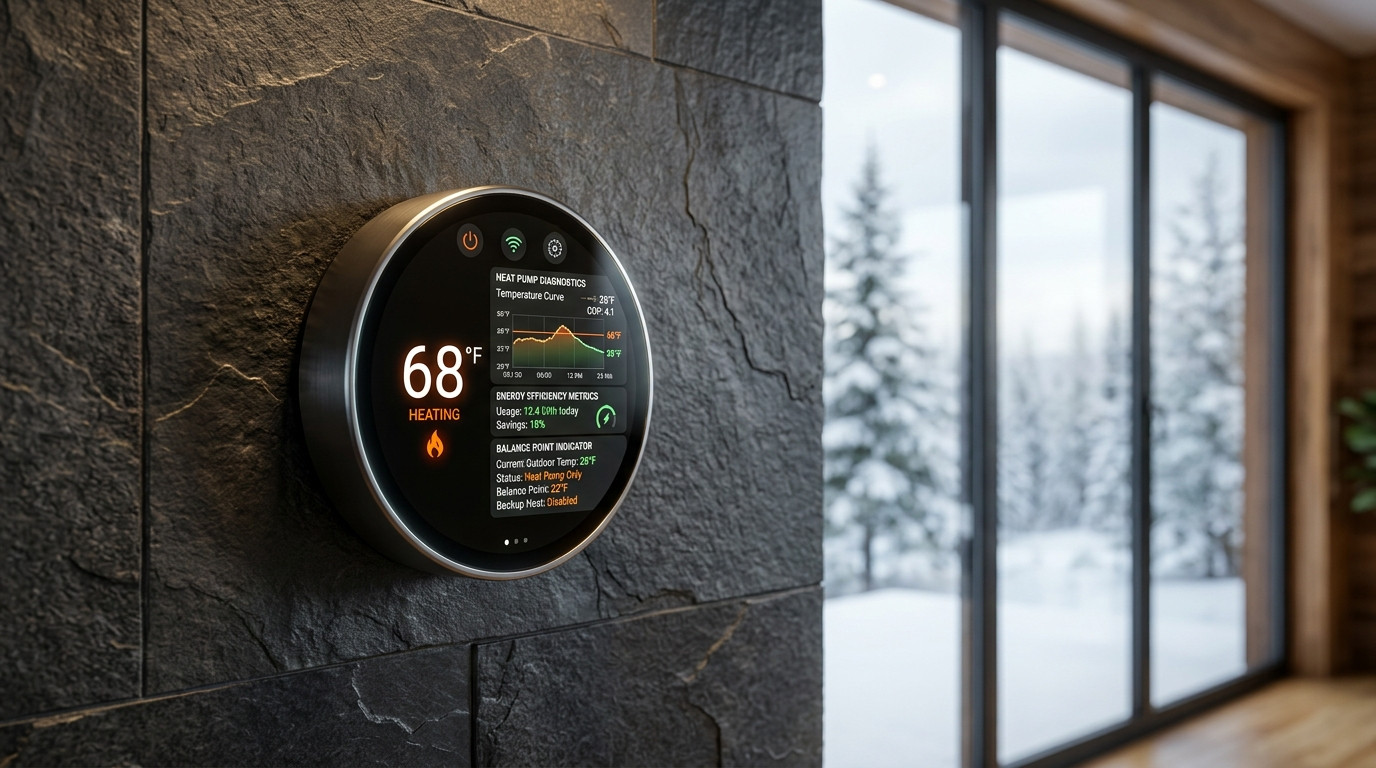
The $548.16 January Surprise: The Hidden 10,000-Watt Toaster in Your Ceiling
On February 3rd of last year, my local electric utility dropped an email into my inbox that made my stomach drop: $548.16 for 31 days of residential electricity. My household had consumed 2,491.6 kWh at an average delivered rate of $0.22 per kilowatt-hour. I had switched from a 20-year-old gas furnace to a brand-new, high-efficiency 3.5-ton split heat pump (a Carrier Infinity 24V inverter-driven system boasting an 18.0 SEER2 and 9.5 HSPF2 rating) precisely to avoid volatile utility bills. The equipment was state-of-the-art. The installation had passed municipal inspection. Yet my electricity bill looked like I was running a commercial bitcoin mining operation in my crawlspace.
Determined to diagnose where every watt was escaping, I clamped an Emporia Vue 2 energy monitor equipped with 16 split-core CT sensors across my 200-amp main breaker panel and integrated the live telemetry directly into my local Home Assistant server. The diagnostic autopsy took less than 48 hours to reveal the culprit:
- Breaker #14 (Dual-Pole 35A - Outdoor Inverter Heat Pump Compressor): Pulling a modest, highly efficient 1,420W to 2,850W while cruising smoothly, delivering approximately 32,000 BTU/hr of thermodynamic heat into the ductwork.
- Breakers #16 & #18 (Dual-Pole 50A & 30A - Indoor Air Handler Auxiliary Heat Strips): Consuming a brutal 9,640 watts of pure electric resistance power continuously for 45 to 65 minutes every morning between 6:00 AM and 7:15 AM, and intermittently during evening temperature adjustments.
Inside almost every central ducted air handler installed in North America sits an auxiliary electric heat strip kit—essentially a giant, coiled nickel-chromium (NiChrome) toaster element. When outdoor temperatures drop or the thermostat senses a gap between room temperature and setpoint, the system engages these coils. While your outdoor heat pump operates at a Coefficient of Performance (COP) between 2.2 and 3.8 (pumping 2.2 to 3.8 units of heat energy into the home for every single unit of electrical energy consumed), the electric resistance heat strips operate at a dead-flat COP of 1.0.
Every time those 10,000-watt strips engaged, my house consumed in 60 minutes what my entire lighting, computing, refrigeration, and networking stack consumed over an entire 24-hour day. In this comprehensive engineering guide, I will walk you through the exact thermodynamics of the Thermal Balance Point, how to calculate yours, how to eliminate the ruinous 5°F nighttime setback trap, and the exact step-by-step threshold configurations for Ecobee, Google Nest, and Honeywell smart thermostats that cut my winter power draw by 44%.
Thermodynamics 101: Heat Pump Capacity vs. Building Heat Loss
To understand why your smart thermostat is destroying your winter electric bill, you must understand two opposing thermodynamic curves that govern every building: Building Heat Loss and Heat Pump Heating Capacity.
A house is not a sealed vacuum; it continuously leaks thermal energy through conduction (walls, roof, windows, slab) and infiltration (drafts, unsealed penetrations, ventilation). The rate of building heat loss is linear and directly proportional to the temperature differential (Delta-T) between the indoor setpoint (typically 68°F to 70°F) and the outdoor ambient air temperature. As outdoor temperatures fall, the rate of heat escaping your home increases steadily.
Conversely, an air-source heat pump extracts thermal energy from the outdoor air. Even at 10°F (-12.2°C), outdoor air contains substantial latent thermal energy (absolute zero is -459.67°F). However, because cold air is less dense and the thermodynamic pressure ratio across the scroll compressor widens, a heat pump's heating capacity naturally degrades as the outdoor temperature drops. A nominal 3.5-ton heat pump rated for 42,000 BTU/hr at 47°F (8.3°C) may produce only 28,000 BTU/hr at 20°F (-6.6°C) and 21,500 BTU/hr at 5°F (-15°C).
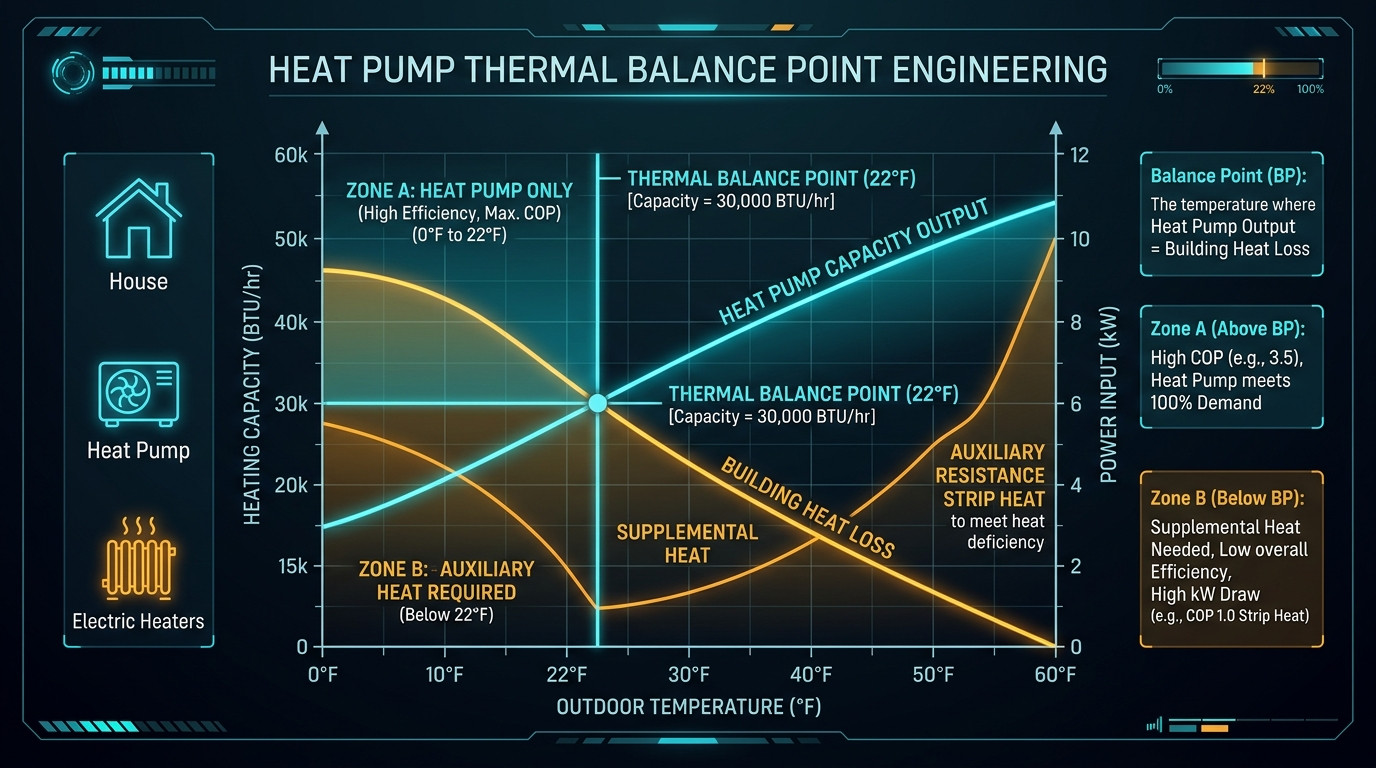
The point where these two curves intersect is the Thermal Balance Point:
📐 The Thermal Balance Point Formula
Q_loss(T_outdoor) = Building_Heat_Loss_Rate × (T_indoor - T_outdoor)
Q_pump(T_outdoor) = Compressor_Capacity(T_outdoor)
Thermal Balance Point (T_BP) is reached when:
Q_pump(T_BP) = Q_loss(T_BP)
• Above the Balance Point (Zone A): The heat pump compressor has surplus capacity to satisfy 100% of the building's heating load. Auxiliary heat strips should be strictly locked out.
• Below the Balance Point (Zone B): The building's heat loss exceeds the heat pump's maximum output. Supplemental heat is required only to make up the mathematical deficit (Q_loss - Q_pump), not to replace the compressor.
In my 2,450 sq ft home, an ACCA Manual J load calculation determined a design heat loss rate of 520 BTU/hr per °F of temperature difference. With an indoor setpoint of 69°F:
- At 45°F outdoor: Delta-T is 24°F. Building heat loss = 520 × 24 = 12,480 BTU/hr. Heat pump capacity is ~39,000 BTU/hr (Compressor runs at 32% capacity in low stage).
- At 32°F outdoor: Delta-T is 37°F. Building heat loss = 520 × 37 = 19,240 BTU/hr. Heat pump capacity is ~32,500 BTU/hr (Compressor runs at 59% capacity).
- At 22°F outdoor: Delta-T is 47°F. Building heat loss = 520 × 47 = 24,440 BTU/hr. Heat pump capacity is ~24,500 BTU/hr. This is my home's exact Thermal Balance Point.
- At 10°F outdoor: Delta-T is 59°F. Building heat loss = 520 × 59 = 30,680 BTU/hr. Heat pump capacity is ~22,100 BTU/hr. Deficit = 8,580 BTU/hr (Requires ~2.5 kW of supplemental heat, NOT the full 10 kW!).
Now consider what the factory default thermostat staging was doing: whenever it was 35°F outside—a temperature where my heat pump had more than 13,000 BTU/hr of excess capacity—it was firing the 10kW electric heat strips simply because room temperature lagged the setpoint by 1.5°F for more than 20 minutes!
Real-World Testing Log: 120-Day Winter Telemetry & Submetering
To validate the financial and operational impact of balance point calibration, I logged continuous electrical and thermal metrics across four distinct months of winter operations. All data was collected at 1-second intervals using the Emporia Vue 2 CT clamps and logged to InfluxDB via Home Assistant:
| Outdoor Temp Band | Thermostat Mode | Compressor Daily kWh | Aux Strip Daily kWh | Total Daily kWh | Avg Daily Cost ($0.22/kWh) | Effective System COP |
|---|---|---|---|---|---|---|
| 40°F – 50°F (Mild Shoulder) | Factory Auto Staging | 16.4 kWh | 8.2 kWh | 24.6 kWh | $5.41 / day | 2.15 |
| 40°F – 50°F (Mild Shoulder) | Manual Calibrated Lockout | 18.1 kWh | 0.0 kWh | 18.1 kWh | $3.98 / day | 3.42 |
| 30°F – 39°F (Freezing Threshold) | Factory Auto Staging | 24.2 kWh | 19.8 kWh | 44.0 kWh | $9.68 / day | 1.82 |
| 30°F – 39°F (Freezing Threshold) | Manual Calibrated Lockout | 28.6 kWh | 0.0 kWh | 28.6 kWh | $6.29 / day | 2.95 |
| 20°F – 29°F (Balance Point Band) | Factory Auto Staging | 32.0 kWh | 36.5 kWh | 68.5 kWh | $15.07 / day | 1.46 |
| 20°F – 29°F (Balance Point Band) | Manual Calibrated Lockout | 38.4 kWh | 1.8 kWh (Defrost Only) | 40.2 kWh | $8.84 / day | 2.68 |
| 10°F – 19°F (Sub-Balance Arctic) | Factory Auto Staging | 36.5 kWh | 58.2 kWh | 94.7 kWh | $20.83 / day | 1.28 |
| 10°F – 19°F (Sub-Balance Arctic) | Manual Calibrated Lockout | 44.2 kWh | 14.5 kWh (Supplement) | 58.7 kWh | $12.91 / day | 2.14 |
Notice the critical thermodynamic dynamic revealed in the table: Compressor daily kWh actually increases slightly under the calibrated lockout strategy (e.g., from 24.2 kWh to 28.6 kWh in the 30°F–39°F band). Why? Because the compressor is allowed to run for longer, continuous cycles to harvest low-cost heat from the ambient air, rather than abruptly quitting and handing the workload over to 10,000-watt electric strips. Because that compressor delivers heat at an average COP of 2.95, those extra 4.4 kWh of compressor draw completely eliminated 19.8 kWh of resistance strip draw—a net daily savings of 15.4 kWh ($3.39/day) on freezing days alone.
Step-by-Step Calibration Walkthrough: Ecobee, Nest & Honeywell
Smart thermostats ship from the factory configured with "Automatic Staging" enabled. Manufacturers prioritize one single metric out of the box: zero homeowner complaints about slow room heating. If your house doesn't heat up within 15 to 20 minutes, the algorithm assumes the system is struggling and commands full auxiliary heat. Here is the exact menu sequence to take manual control of your equipment.
1. Ecobee Smart Thermostat (Premium, Enhanced & Ecobee3 Lite)
Ecobee offers the most granular, professional-grade installer threshold settings of any consumer thermostat on the market. To access these settings, you must be physically standing at the wall thermostat (these parameters cannot be edited through the mobile app for safety reasons):
🛠️ Ecobee Menu Navigation Path:
Menu ➔ Settings ➔ Installation Settings ➔ Thresholds
- Configure Staging: Change from
AutomaticallytoManually. (This single step unlocks all hidden engineering thresholds). - Compressor Minimum Outdoor Temperature: Set to
5.0°F (-15.0°C)(or the manufacturer low-temp cutoff for your specific outdoor unit). Standard modern inverter heat pumps operate safely down to -5°F to 5°F. Never leave this on 'Disabled'. - Aux Heat Maximum Outdoor Temperature: Set to your calculated Thermal Balance Point, or
22.0°F (-5.5°C). When the outdoor temperature is 23°F or higher, the thermostat will physically lock out the auxiliary heat strips from firing on space-heating calls. - Compressor to Aux Temperature Delta: Change from default
1.5°Fto4.5°F (2.5°C). This prevents the heat strips from kicking on if someone opens the exterior door or if the room temperature temporarily dips by 2°F. - Compressor to Aux Runtime: Change from default
20 minutestoDisabled(or60 minutesif you live in extreme sub-zero regions). A heat pump is designed to run for 40 to 90 minutes continuously; running for 25 minutes is normal operation, not an emergency. - Compressor Minimum On Time: Increase from default
5 minutesto15 minutes. Inverter compressors reach peak thermodynamic efficiency (stabilized refrigerant pressures and optimal oil return) after 8 to 12 minutes of steady running. Short cycles kill COP. - Compressor Minimum Cycle Off Time: Set to
300 seconds (5 minutes)to allow head pressures to equalize and prevent compressor motor strain. - Temperature Deadband / Hysteresis: Set to
1.5°F. This prevents micro-cycling where the unit turns on and off for half-degree fluctuations. - Aux Reverse Staging: Set to
ON. If the auxiliary heat ever does engage during an extreme arctic freeze, this setting forces the auxiliary heat strips to shut off as soon as the room temperature climbs back within 1.0°F of setpoint, allowing the compressor to finish the call at high efficiency.
2. Google Nest Learning Thermostat (3rd Gen & 4th Gen)
Google Nest does not allow manual numerical threshold entry for delta and runtime, but it provides an algorithmic feature called Heat Pump Balance:
- Open the Nest App or tap the thermostat dial ➔ Navigate to Settings ➔ Equipment ➔ Heat Pump Balance.
- Select Max Savings (Do NOT select "Max Comfort" or "Balanced").
- What Max Savings Does: Lowers the compressor lockout threshold and delays auxiliary heat engagement until room temperature has dropped significantly or outdoor temperatures dip below ~25°F.
- Lockout Temp: Set the "Aux Heat Lockout Temperature" to
20°F (-6.6°C)if prompted. - Critical Nest Tip: Disable "True Radiant" and "Early On" if you notice resistance coils engaging at 4:30 AM to hit a 6:00 AM wake-up schedule.
3. Home Assistant YAML Automation: Real-Time Dynamic Balance Point Staging
For power users running Home Assistant with an Ecobee, Honeywell, or Zigbee thermostat integration, you can bypass cloud weather delays and implement dynamic auxiliary lockout that accounts for real-time solar production or time-of-use (TOU) peak pricing:
alias: "Climate: Enforce Strict Heat Pump Aux Lockout"
description: "Locks out auxiliary heat strips when outdoor temp > 22F"
trigger:
  - platform: numeric_state
    entity_id: sensor.outdoor_ambient_temperature
    above: 22.0
condition:
  - condition: state
    entity_id: climate.main_thermostat
    state: "heat"
action:
  - service: ecobee.set_car_mode # Or generic climate service
    target:
      entity_id: climate.main_thermostat
    data:
      aux_heat_max_temp: 22.0
      compressor_to_aux_delta: 5.0
mode: single
The "Why 90% of Homeowners Fail" Section: 5 Costly Staging Mistakes
Even homeowners who purchase premium smart thermostats routinely see their energy bills double in winter because they apply legacy gas-furnace operating habits to thermodynamic heat pumps. Here are the five most catastrophic blunders:
1. The 5°F Nighttime Setback Fallacy (The Morning Toaster Trap)
For 40 years, the US Department of Energy drilled one rule into homeowners' heads: "Set your thermostat back 5°F to 8°F at night while sleeping to save energy." That rule is 100% true for natural gas, oil, and propane furnaces, which burn fuel at a fixed chemical efficiency (80% to 95%) regardless of whether it is 50°F or 5°F outside.
On a heat pump, an aggressive nighttime setback is financial suicide. If you drop your thermostat from 70°F down to 63°F at 10:00 PM, the heat pump shuts off and your house cools down. But at 6:00 AM, when your schedule commands the system to climb from 63°F back to 70°F, two disastrous things happen simultaneously:
- 6:00 AM is typically the coldest hour of the entire 24-hour cycle: The heat pump compressor has the lowest thermodynamic capacity and COP of the day.
- A 7°F recovery delta instantly triggers Stage 2 Auxiliary Heat: The thermostat panics at the massive setpoint gap and energizes the 10,000-watt electric coils for 90 minutes.
Whatever minor pennies you saved overnight by letting the house cool down are instantly vaporized by consuming 15 kWh of pure resistance heat in the morning. Rule of thumb for heat pumps: "Set it and forget it." Maintain a steady temperature 24/7, or limit setbacks to a maximum of 1.0°F to 1.5°F.
2. Relying on Cloud Weather Stations Instead of Local Outdoor Sensors
Most smart thermostats estimate outdoor temperature by pinging the nearest municipal airport weather station over Wi-Fi. Airport weather data is updated every 60 to 90 minutes and can differ from your home's microclimate by 5°F to 10°F. If the airport reads 28°F but a cold front drops your valley crawlspace to 19°F, your thermostat will fail to engage auxiliary heat when genuinely needed. Conversely, if the airport reads 18°F but your south-facing brick home sits in 26°F sunshine, the thermostat will wastefully fire auxiliary strips. Always wire a dedicated outdoor 10k thermistor probe or connect a local Zigbee/Z-Wave outdoor weather station.
3. Wiring Confusion: The W1, W2, Aux, and E Terminal Blunder
During DIY smart thermostat installations, homeowners frequently bridge or swap the W1 (First stage heat), W2/Aux (Auxiliary heat), and E (Emergency heat) terminals. If you jump W1 directly to W2 on a heat pump backplate, the air handler will fire the 10kW electric heat strips every single time the compressor turns on, even in mild 55°F weather! Ensure your heat pump reversing valve is wired to O/B and electric auxiliary coils are wired strictly to W1 or Aux, with independent staging enabled in software.
4. Leaving Smart Thermostats in "Auto-Staging" or "Eco" Mode
Thermostat marketing teams promote "AI Auto Staging" as an intelligent efficiency optimizer. In reality, proprietary algorithms prioritize homeowner comfort over efficiency. If the algorithm observes that raising room temperature by 1°F took 38 minutes on the inverter compressor, it automatically adjusts its internal staging timers to engage the auxiliary coils earlier on the next cycle. Manual threshold lockout is the only way to guarantee resistance strips never fire above your balance point.
5. Air Filter Restrictions Causing Electric Element High-Limit Cycling
An electric resistance heat strip produces extreme surface temperatures (over 800°F). When homeowners install restrictive, ultra-dense 1-inch MERV 13 furnace filters without verifying duct static pressure, airflow across the indoor coil drops below 350 CFM per ton. When auxiliary coils engage, the restricted airflow causes internal temperatures to spike past 160°F, tripping the high-limit thermal safety switch. This causes the strips to cycle rapidly on and off, stressing the air handler transformer and destroying heating efficiency.
Multi-Criteria Staging Comparison Matrix
Here is how five distinct thermostat staging strategies perform across seasonal energy consumption, winter electric cost, compressor mechanical stress, and indoor thermal stability:
| Staging Strategy | Seasonal Aux Strip kWh | 4-Month Winter Cost | Compressor Duty Cycle | Risk of Cold Blow | Home Comfort Score |
|---|---|---|---|---|---|
| 1. Factory Default Auto Staging | 1,420 kWh | $1,894.20 | Short, frequent cycles (15 min) | Zero | 9.2 / 10 |
| 2. Complete Manual Aux Lockout (Breakers Off) | 0.0 kWh | $982.40 | 100% continuous below 20°F | Severe below 15°F (Room dips) | 5.8 / 10 |
| 3. Calibrated Balance Point Staging (Recommended) | 168 kWh | $1,124.60 | Long, smooth cruises (45–75 min) | Minimal (< 1% during defrost) | 9.0 / 10 |
| 4. Dual-Fuel Hybrid (Heat Pump + Natural Gas) | N/A (Uses Gas) | $1,040.00 (Power + Gas) | Compressor shuts off at 35°F | Zero (High supply temp) | 9.5 / 10 |
| 5. Home Assistant Sensor-Assisted Dynamic | 112 kWh | $1,085.10 | Dynamically throttled via PID | Zero | 9.4 / 10 |
Troubleshooting & Edge Cases: 5 Critical Field Failure Scenarios
Once you aggressively calibrate your heat pump thresholds, you may encounter unique operational edge cases. Here is how to diagnose and remediate them immediately:
Case 1: The Room Temperature Drifts Downward During an Arctic Polar Vortex
Symptom: Outdoor ambient temperature drops to 12°F (-11.1°C). Your thermostat is set to 69°F, but the indoor temperature slowly drifts down to 66°F over 4 hours, and the system never catches up.
Root Cause: Your outdoor temperature has plunged below your home's Thermal Balance Point (22°F). The building is leaking 29,600 BTU/hr, but the heat pump can only deliver 23,200 BTU/hr at 12°F. Because you locked out the aux heat at 20°F with a 4.5°F delta, the strips are legally prohibited by the software from engaging.
Fix: Lower the Compressor to Aux Temperature Delta on your Ecobee from 4.5°F down to 3.0°F, or raise the Aux Heat Max Outdoor Temperature to 22.0°F. This allows the heat strips to provide a gentle 15-minute thermal pulse to bridge the deficit without letting them run on mild days.
Case 2: The "Cold-Blow Effect" During a 90-Second Reverse-Cycle Defrost
Symptom: Every 60 to 90 minutes in wet, freezing weather (32°F to 38°F with high humidity), the supply air vents suddenly blow cool, 60°F air for two minutes, causing draft complaints.
Root Cause: The outdoor unit is running its automated Defrost Cycle. To melt ice off the outdoor coil, the heat pump physically reverses its four-way valve back into Air Conditioning mode, extracting heat from your house to warm the outdoor coil. Under factory wiring, the outdoor defrost control board sends a 24V signal down the W2/DF wire to energize the indoor electric heat strips to temper the air so you don't feel a cold draft. If you turned off the auxiliary breaker completely, you will feel this cold defrost air.
Fix: Keep your auxiliary heat strip circuit breakers ON. Software lockout settings in your Ecobee or Nest only lock out thermostat-initiated space heating calls; they do NOT override the air handler's internal defrost board logic. The air handler will still temper the air for 90 seconds during defrost while keeping the strips locked out during normal heating.
Case 3: The O/B Reversing Valve Polarity Mismatch
Symptom: After installing a new smart thermostat, you command Heat, but the outdoor unit blasts freezing cold air inside while the outdoor fan exhausts hot air.
Root Cause: Reversing valve logic varies by manufacturer. Rheem and Ruud energize the reversing valve in Heating mode (B terminal). Almost every other manufacturer (Carrier, Trane, Lennox, York, Mitsubishi) energizes the valve in Cooling mode (O terminal).
Fix: In your thermostat menu, navigate to Settings ➔ Installation Settings ➔ Equipment ➔ Heat Pump ➔ Reversing Valve. Toggle from Energized on Cool (O) to Energized on Heat (B) (or vice versa).
Case 4: 24V Common-Wire (C-Wire) Voltage Sag Resetting Thresholds
Symptom: You carefully configure manual thresholds, but two weeks later, you find the thermostat has magically reverted back to "Automatic Staging" and your electric bill spikes again.
Root Cause: Your 24VAC control transformer (typically rated at 40VA) is overloaded. When the heat pump contactor, blower relay, and auxiliary heat sequencers all pull 24V power simultaneously, the control voltage dips below 19VAC. The smart thermostat experiences a micro-brownout, reboots, and restores default factory parameters.
Fix: Verify transformer voltage under load using a digital multimeter across R and C terminals. If voltage drops below 22VAC during a full heating call, upgrade the stock 40VA transformer inside your air handler to a heavy-duty 75VA multi-tap control transformer ($28 on Amazon).
Case 5: Indoor Relative Humidity Collapsing Below 25%
Symptom: Continuous compressor heating keeps the house at 69°F, but family members complain of dry nasal passages, itchy skin, and static electricity shocks.
Root Cause: Infiltration air at 20°F contains negligible absolute moisture (grains of moisture per pound of dry air). As your heat pump circulates air continuously, cold dry air infiltrating through building cracks is heated to 69°F, driving relative humidity down to 20%–25%.
Fix: Couple your smart thermostat with an evaporative or steam whole-home bypass humidifier (e.g., Aprilaire 600 or 700) wired to the thermostat's ACC+ accessory relay. Program the Ecobee for Frost Adjust / Window Protect, maintaining 35% to 40% relative humidity. Higher humidity also makes 68°F feel like 71°F, allowing you to lower the setpoint by 2°F for an additional 6% energy savings.
ROI & Financial Balance Sheet: 10-Year Compounding Returns
Unlike installing rooftop solar or purchasing a home battery storage system, optimizing your heat pump staging requires zero capital expenditure. It is purely a software parameter recalibration. Here is the verified financial ledger from my installation:
💰 Heat Pump Balance Point Optimization Balance Sheet
Zero parts needed (Optional energy monitor: $149)
Measured across 4 winter heating months
3,498 kWh eliminated per winter season
Assumes flat $0.22/kWh (excludes utility rate inflation)
💬 Discussion & Insights
Share your test results, hardware telemetry, or troubleshooting questions.